'You've got to find what you love,' Jobs says
This is the
text of the Commencement address by Steve Jobs, CEO of Apple Computer
and of Pixar Animation Studios, delivered on June 12, 2005.
I am
'You've got to find what you love,' Jobs says
This is the
text of the Commencement address by Steve Jobs, CEO of Apple Computer
and of Pixar Animation Studios, delivered on June 12, 2005.
I am
There is a good reference from Internet shows how to send email messages and attachments by C#
The article provide a simple description of the process required to send an email message with our without attachments. Further, the procedure for configuring IIS and the STMP mail server is described.
1. Open C:\WINCE600\PUBLIC\SHELL\OAK\HPC\EXPLORER\TASKBAR\taskbar.cpp in text editor
2. Mark all code under the WM_RBUTTONUP
case WM_RBUTTONUP:
{
//+nucca
- Key software aim is to develop software to improve customers’ development and deployment experience:
- Free developers from hardware driver development, so they can speed as much time as possible on actual game play.
- Improve time-to-market for customers’ products.
- Support Windows Embedded by creating custom components.
- Produce detailed and accurate documentation
1. remove the content of DoPowerCheck() of housekp.cpp
File: C:\WINCE500\PUBLIC\WCESHELLFE\OAK\TASKMAN\housekp.cpp
Note: If you don't remove the content of DoPowerCheck(),
it may cause the link error (_GetSystemPowerStatusEx)
2. Build taskman.lib
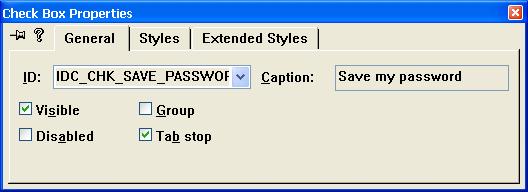
Description: Make the RDP can save the password after system reboots.
STEP:
Add Password Checkbox.
1. Copy res file from C:\WINCE420\PUBLIC\RDP\OAK\UIT\CETSC\RES into C:\WINCE420\PUBLIC\RDP\OAK\UIT\CETSC\UI
2. Open tscui.res with Platform Builder
You can create a welcome application that runs when the user starts a Windows CE-based device for the first time. This application can request such information as the name of the user and a name for the Windows CE-based device.
Shortcut or link (.lnk) files are very small files that provide a link to another file.
You can use .lnk files to point to files located in the Windows directory. If you do not use .lnk files, you can only give a ROM file a presence in the file system outside of the Windows directory by making a full copy of the ROM file through a file system file.
The following procedure shows how to create a desktop shortcut file. After you create the file, you must add it to your run-time image. Also, you must typically place a copy of the file in the file system outside the Windows directory.
To create a desktop shortcut file
1. From the File menu in Platform Builder, choose New Project or File.
1. Add user and password.
NTLMSetUserInfo(_T("UserName"), _T("Password"))
If it is added successfully, it will be locate at
HKEY_LOCAL_MACHINE\Comm\Security\UserAccounts\<username>
2. Add id to FTP Server User List
The following table specifies the limits on physical memory for Windows 7.
| Version | Limit in 32-bit Windows | Limit in 64-bit Windows | Windows 7 Ultimate |
|---|

WES 7 will be formal announce @April 27th in ESC. Toolkit release schedule it to June 1st and License sticker won't be purchased until June 18th. Those information about WES 7 in this blog was from Microsoft public seminar materials. Not too much information but still be attractive.