- 1月 13 週四 201115:53
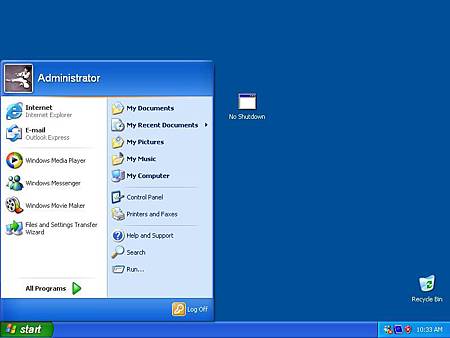
◎ Remove Shutdown Button from WES2009
- 12月 29 週三 201018:15
◎ Send Email Messages and Attachments Using C#
There is a good reference from Internet shows how to send email messages and attachments by C#
http://www.c-sharpcorner.com/uploadfile/scottlysle/emailattachmentscs08052008234321pm/emailattachmentscs.aspx
The article provide a simple description of the process required to send an email message with our without attachments. Further, the procedure for configuring IIS and the STMP mail server is described.
http://www.c-sharpcorner.com/uploadfile/scottlysle/emailattachmentscs08052008234321pm/emailattachmentscs.aspx
The article provide a simple description of the process required to send an email message with our without attachments. Further, the procedure for configuring IIS and the STMP mail server is described.
- 12月 18 週六 201017:35
◎ How to remove right-click from Windows CE taskbar
1. Open C:\WINCE600\PUBLIC\SHELL\OAK\HPC\EXPLORER\TASKBAR\taskbar.cpp in text editor
2. Mark all code under the WM_RBUTTONUP
case WM_RBUTTONUP:
{
//+nucca
RETAILMSG(1, (TEXT("Shell: no right click\r\n")));
/*
pt.x = (int)LOWORD(lParam);
pt.y = (int)HIWORD(lParam);
2. Mark all code under the WM_RBUTTONUP
case WM_RBUTTONUP:
{
//+nucca
RETAILMSG(1, (TEXT("Shell: no right click\r\n")));
/*
pt.x = (int)LOWORD(lParam);
pt.y = (int)HIWORD(lParam);
- 12月 10 週五 201017:48
◎ How to produce valuable software packages
- Key software aim is to develop software to improve customers’ development and deployment experience:
- Free developers from hardware driver development, so they can speed as much time as possible on actual game play.
- Improve time-to-market for customers’ products.
- Support Windows Embedded by creating custom components.
- Produce detailed and accurate documentation
>details of each API and its function with examples.
>How-to: task-oriented answers to common questions
>Web-based (knowledge-base) access to the above.
- Free developers from hardware driver development, so they can speed as much time as possible on actual game play.
- Improve time-to-market for customers’ products.
- Support Windows Embedded by creating custom components.
- Produce detailed and accurate documentation
>details of each API and its function with examples.
>How-to: task-oriented answers to common questions
>Web-based (knowledge-base) access to the above.
- 11月 20 週六 201018:02
◎ How to build Windows CE image in Taskman shell
1. remove the content of DoPowerCheck() of housekp.cpp
File: C:\WINCE500\PUBLIC\WCESHELLFE\OAK\TASKMAN\housekp.cpp
Note: If you don't remove the content of DoPowerCheck(),
it may cause the link error (_GetSystemPowerStatusEx)
File: C:\WINCE500\PUBLIC\WCESHELLFE\OAK\TASKMAN\housekp.cpp
Note: If you don't remove the content of DoPowerCheck(),
it may cause the link error (_GetSystemPowerStatusEx)
- 10月 07 週四 201017:43
◎ Saving Password in RDP for Windows CE
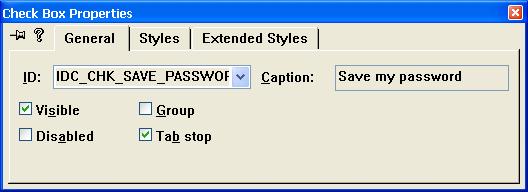
Description: Make the RDP can save the password after system reboots.
STEP:
Add Password Checkbox.
- 9月 14 週二 201017:58
◎ Create a Welcome Application for WinCE
You can create a welcome application that runs when the user starts a Windows CE-based device for the first time. This application can request such information as the name of the user and a name for the Windows CE-based device.
Add the application to the startup group by creating a shortcut to your application and modifying a Project.bib file and .dat file to put the shortcut to your application in the startup folder on the image. You can create shortcuts by calling SHCreateShortcut or SHCreateShortcutEx. The following example shows the code that you need to add to your Project.bib file.
welcome.lnk $(_FLATRELEASEDIR)\welcome.lnk NK SH
The following example shows the code that you need to add to your Project.dat file.
Directory("\Windows\Startup"):-File("welcome.lnk","\Windows\startup\welcome.lnk")
For information about these files, see Binary Image Builder File and File System File. You can also use the launch sequence in the registry to automatically launch your application. For information about using the launch sequence in the registry, see Configuring the Process Boot Phase. When your application finishes, your application should delete the link from the startup folder.
Ensure that your application runs to completion and that users have completed any necessary steps before using the operating system and before other applications start.
For example, you could make your application window the topmost window on the system. You also need to handle attempts from other applications to obtain the focus. The following example shows how to make your application window the topmost window.
// Put the window on top and show it.
SetWindowPos(hWnd, HWND_TOPMOST, 0, 0, 0, 0,
SWP_NOMOVE | SWP_NOSIZE | SWP_SHOWWINDOW);
Include a call to the TouchCalibrate function before doing anything that requires user input, if your target device uses a touch screen.
Add the application to the startup group by creating a shortcut to your application and modifying a Project.bib file and .dat file to put the shortcut to your application in the startup folder on the image. You can create shortcuts by calling SHCreateShortcut or SHCreateShortcutEx. The following example shows the code that you need to add to your Project.bib file.
welcome.lnk $(_FLATRELEASEDIR)\welcome.lnk NK SH
The following example shows the code that you need to add to your Project.dat file.
Directory("\Windows\Startup"):-File("welcome.lnk","\Windows\startup\welcome.lnk")
For information about these files, see Binary Image Builder File and File System File. You can also use the launch sequence in the registry to automatically launch your application. For information about using the launch sequence in the registry, see Configuring the Process Boot Phase. When your application finishes, your application should delete the link from the startup folder.
Ensure that your application runs to completion and that users have completed any necessary steps before using the operating system and before other applications start.
For example, you could make your application window the topmost window on the system. You also need to handle attempts from other applications to obtain the focus. The following example shows how to make your application window the topmost window.
// Put the window on top and show it.
SetWindowPos(hWnd, HWND_TOPMOST, 0, 0, 0, 0,
SWP_NOMOVE | SWP_NOSIZE | SWP_SHOWWINDOW);
Include a call to the TouchCalibrate function before doing anything that requires user input, if your target device uses a touch screen.
- 8月 19 週四 201017:52
◎ Creating a Shortcut File for WinCE
Shortcut or link (.lnk) files are very small files that provide a link to another file.
You can use .lnk files to point to files located in the Windows directory. If you do not use .lnk files, you can only give a ROM file a presence in the file system outside of the Windows directory by making a full copy of the ROM file through a file system file.
The following procedure shows how to create a desktop shortcut file. After you create the file, you must add it to your run-time image. Also, you must typically place a copy of the file in the file system outside the Windows directory.
To create a desktop shortcut file
1. From the File menu in Platform Builder, choose New Project or File.
2. In the New Project or File dialog box, select the Files tab.
3. Choose the Text File type.
4. In the File name box, enter <File Name>.lnk.
You can use .lnk files to point to files located in the Windows directory. If you do not use .lnk files, you can only give a ROM file a presence in the file system outside of the Windows directory by making a full copy of the ROM file through a file system file.
The following procedure shows how to create a desktop shortcut file. After you create the file, you must add it to your run-time image. Also, you must typically place a copy of the file in the file system outside the Windows directory.
To create a desktop shortcut file
1. From the File menu in Platform Builder, choose New Project or File.
2. In the New Project or File dialog box, select the Files tab.
3. Choose the Text File type.
4. In the File name box, enter <File Name>.lnk.
- 7月 23 週五 201017:54
◎ [WinCE] How to Setup FTP with password
1. Add user and password.
NTLMSetUserInfo(_T("UserName"), _T("Password"))
If it is added successfully, it will be locate at
HKEY_LOCAL_MACHINE\Comm\Security\UserAccounts\<username>
NTLMSetUserInfo(_T("UserName"), _T("Password"))
If it is added successfully, it will be locate at
HKEY_LOCAL_MACHINE\Comm\Security\UserAccounts\<username>
- 5月 17 週一 201016:05
◎ Memory Limits for Windows Releases
Physical Memory Limits: Windows 7
The following table specifies the limits on physical memory for Windows 7.
Version Limit in 32-bit Windows Limit in 64-bit Windows
Windows 7 Ultimate
Windows 7 Enterprise
Windows 7 Professional
Windows 7 Home Premium
Windows 7 Home Basic
Windows 7 Starter
The following table specifies the limits on physical memory for Windows 7.
4 GB
192 GB
4 GB
192 GB
4 GB
192 GB
4 GB
16 GB
4 GB
8 GB
2 GB
2 GB

 English Articles (1)